Zapier, Make, n8n, or Custom Software?
A practical guide for deciding whether your workflow needs a quick automation, a flexible no-code system, or a custom-built AI application.

The tool is not the strategy
A lot of automation projects start with the wrong question.
Teams ask whether they should use Zapier, Make, n8n, or custom software before they have clearly defined the workflow they are trying to improve.
That usually leads to bad decisions.
Zapier might be too limited. Custom software might be overkill. n8n might be powerful, but unnecessarily technical for the team maintaining it. Make might handle the logic well, but still leave the business with a workflow that becomes difficult to govern later.
The better question is not “which tool should we use?”
The better question is:
What does this workflow need to do, how important is it to the business, and how much control do we need over it?
Once that is clear, the tool choice becomes much easier.
Start with the workflow, not the platform
Before choosing anything, map the workflow in plain language.
For example:
A lead fills out a contact form. The business needs to qualify the lead, save it in a CRM, notify the right person, create a follow-up task, draft a reply, and make sure nobody forgets to respond.
That workflow can be built in many ways.
A simple version could be built in Zapier. A more flexible version could be built in Make. A more technical and customizable version could be built in n8n. A fully owned version could be built as a custom internal system.
None of those options are automatically right.
The right choice depends on the complexity of the workflow, the cost of failure, the number of tools involved, and how much the business expects the process to grow.
The simplest useful solution usually wins
A workflow should not be custom-built just because custom software sounds more impressive. If a reliable automation tool can solve the problem cleanly, that is often the smarter starting point.
When Zapier makes sense
Zapier is usually the fastest way to connect common business tools.
It is a good fit when the workflow is simple, the logic is clear, and the company needs something live quickly.
For example, Zapier can work well for:
- sending form submissions into a CRM
- creating tasks from new customer requests
- notifying a Slack channel when a deal moves stage
- adding newsletter subscribers to an email platform
- sending simple follow-up emails after a trigger
- moving data between popular SaaS tools
Zapier is strongest when the automation follows a clean pattern:
If this happens, do that.
It is especially useful for businesses that do not want to manage infrastructure, code, or complex technical workflows. The team can move fast, test ideas, and automate small operational tasks without turning the project into a software build.
Where Zapier can become limiting
Zapier starts to feel limiting when workflows need advanced branching, custom data handling, deeper error recovery, or more control over how information is transformed.
It can also become harder to manage when a business has many Zaps doing related things across different parts of the company. At that point, the issue is not just automation. It becomes system design.
Zapier is great for speed. It is not always the best fit for complex operational logic.
When Make makes sense
Make is a strong option when the workflow needs more visual control and more flexible logic.
It is useful when a process has multiple branches, filters, routers, data formatting steps, or different outcomes depending on what happens along the way.
For example, Make can work well for:
- multi-step lead routing
- content approval workflows
- operations dashboards fed by several tools
- invoice or order processing flows
- conditional customer communication
- workflows that need formatting, parsing, or enrichment
Make gives you a more visual way to understand what is happening. That can be helpful when a workflow has many steps and the business needs to see how data moves from one tool to another.
Where Make can become limiting
Make can still become difficult to manage if the workflow becomes mission-critical, heavily customized, or deeply tied to proprietary business logic.
Visual workflows can also get messy if they grow without structure. A scenario that starts as a clean automation can turn into a large web of routes, filters, and patches.
Make is powerful, but it still needs good workflow design.
When n8n makes sense
n8n is a good fit when the business wants more control and more technical flexibility.
It can be especially useful for teams that are comfortable with more advanced workflows, custom logic, API calls, self-hosting, or deeper backend-style automation.
n8n can work well for:
- custom API integrations
- internal operations workflows
- AI workflows with multiple processing steps
- data enrichment and routing
- backend automations
- workflows that need code nodes or custom logic
- companies that want more control over hosting and execution
n8n sits in an interesting middle ground. It can move faster than building a full custom app, but it gives more flexibility than many simpler automation platforms.
For technical teams, that can be a major advantage.
Where n8n can become limiting
n8n is not always the best choice for non-technical teams that need a very simple interface. It can also require more setup, maintenance, and operational thinking than Zapier or Make.
If the business does not want to think about hosting, credentials, workflow structure, or technical debugging, n8n may be more than they need.
It is powerful, but power comes with responsibility.
n8n is not just another Zapier clone
n8n is often better thought of as a workflow automation layer for teams that want more technical control, not just a simple connector between apps.
When custom software makes sense
Custom software makes sense when the workflow is too important, too specific, or too central to the business to live entirely inside a generic automation tool.
That does not always mean building a huge platform.
Sometimes custom software is a small internal tool. Sometimes it is a dashboard. Sometimes it is a backend service that coordinates multiple systems. Sometimes it is an AI-powered application that gives the team one clean interface for work that currently happens across five tools.
Custom software starts to make sense when:
- the workflow is directly tied to revenue
- the team needs a custom interface
- the logic is too specific for generic tools
- several user roles need different permissions
- data needs to be stored and queried in a structured way
- reporting is important
- the workflow needs to scale
- errors are expensive
- the company needs ownership over the system
- automation tools are creating too many workarounds
The biggest advantage of custom software is control.
The system can be designed around how the business actually works instead of forcing the business to fit inside someone else’s tool.
A simple decision framework
The easiest way to decide is to look at four things:
1. Complexity
If the workflow is simple, Zapier may be enough.
If it has multiple branches and transformations, Make may be better.
If it needs advanced logic, custom API calls, or deeper control, n8n may be a stronger fit.
If it needs a custom interface, database, permissions, reporting, or proprietary logic, custom software may be the right move.
2. Importance
Not every workflow deserves the same investment.
A small notification workflow does not need a custom platform. A revenue-critical lead qualification system might.
If the workflow breaks, what happens?
If the answer is “someone gets mildly annoyed,” keep it simple.
If the answer is “we lose leads, delay customers, miss revenue, or create operational risk,” the workflow deserves more structure.
3. Maintainability
A workflow is only useful if the team can maintain it.
A messy automation can become technical debt very quickly. Nobody remembers why it was built. Nobody knows which step is failing. Nobody wants to touch it because one small change might break everything.
This is where documentation, ownership, and clean design matter.
The question is not just “can we build this?”
The question is “can we trust this six months from now?”
4. Ownership
Some workflows are fine living inside third-party automation tools.
Others should be owned more directly by the business.
If the workflow contains important business logic, sensitive data, customer-facing behavior, or long-term operational value, ownership becomes more important.
That does not always mean custom software on day one. But it does mean designing the workflow in a way that can evolve.
A practical example
Imagine a company wants to automate inbound lead handling.
A basic Zapier workflow might look like this:
A form is submitted. The lead is added to HubSpot. The team gets a Slack notification. A confirmation email is sent.
That is simple and useful.
A Make workflow might add more logic:
The lead is checked against certain criteria. Different service categories route to different people. The lead source is formatted. A task is created only if the budget is above a certain amount. A follow-up sequence is triggered based on the selected service.
That is more flexible.
An n8n workflow might go deeper:
The system calls multiple APIs, enriches the company profile, uses AI to summarize the inquiry, classifies the lead, checks existing CRM records, creates internal notes, and routes the lead with more advanced logic.
That is more technical and more controllable.
A custom system might go further:
The business has a private lead dashboard, custom scoring, role-based access, AI-generated briefs, approval flows, reporting, and a full history of every action taken on each lead.
That is no longer just an automation.
That is an internal operating system for a key business process.
Avoid building too much too early
One of the biggest mistakes companies make is jumping straight into custom software before proving the workflow.
Sometimes the best first move is a simple automation that validates the process.
Can we save time here? Does this routing logic make sense? Does the team actually use the output? Does the follow-up improve? Does this remove friction?
Once the workflow proves valuable, then it may make sense to strengthen it.
That could mean moving from Zapier to Make, from Make to n8n, or from an automation platform into a custom-built system.
Good systems often evolve in stages.
Avoid staying too simple for too long
The opposite mistake is also common.
A company keeps stacking more and more automations on top of each other because each individual fix feels easy. But eventually, the whole system becomes fragile.
There are too many Zaps. Too many scenarios. Too many hidden dependencies. Too many people afraid to change anything.
At that point, simplicity has become complexity in disguise.
If an automation tool is holding together a workflow that is now central to the business, it may be time to redesign the system properly.
Where AI fits into the decision
AI can be added to any layer, but the way it is used should depend on the workflow.
In Zapier, AI might generate a simple email draft or summarize a form submission.
In Make, AI might classify requests, branch workflows, format responses, or generate internal briefs.
In n8n, AI might become part of a more advanced chain involving APIs, databases, documents, and custom logic.
In custom software, AI can become part of the product or internal system itself, with dedicated interfaces, permissions, memory, reporting, and deeper integration into business operations.
The more important the AI output is, the more structure the system needs around it.
AI should not be treated as a random text generator. It should have context, guardrails, review points, and a clear place inside the workflow.
The best answer is often a hybrid
The choice is not always one tool.
Many strong systems use a hybrid approach.
A business might use Zapier for simple notifications, Make for marketing workflows, n8n for deeper technical automations, and custom software for the core internal system.
That is perfectly fine.
The goal is not to force every workflow into one platform. The goal is to use the right level of system for the job.
Simple workflows should stay simple.
Important workflows should be designed properly.
Final thought
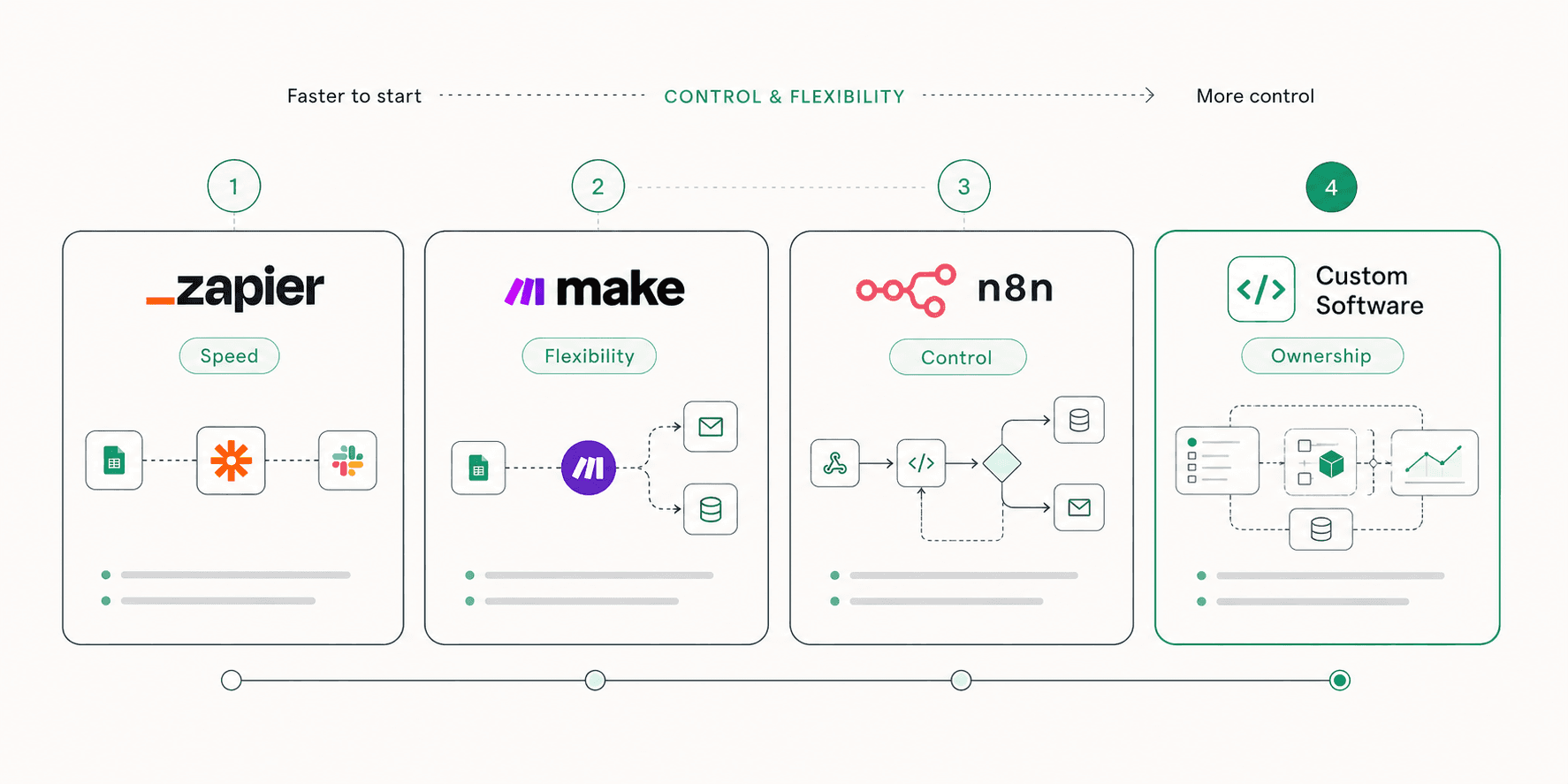
Zapier, Make, n8n, and custom software are not competing answers to the same problem.
They are different levels of control.
Zapier is speed.
Make is flexibility.
n8n is technical control.
Custom software is ownership.
The right choice depends on what the workflow needs to become.
If the goal is to connect a few tools and save time, use the simplest automation that works. If the workflow is becoming central to how the business sells, serves customers, reports, or operates, it may deserve a stronger system.
The best automation strategy is not about using the most advanced tool.
It is about building the right amount of system around work that matters.
Want help turning ideas like this into product, design, or growth systems?
Talk with Avalency about landing pages, product design, development, and AI workflows.